Blog··8 min read
How to Build a Link-in-Bio Setup for Creators
A practical framework for deciding what belongs on your creator bio link, what to pin first, and how to keep the page useful as your content changes.
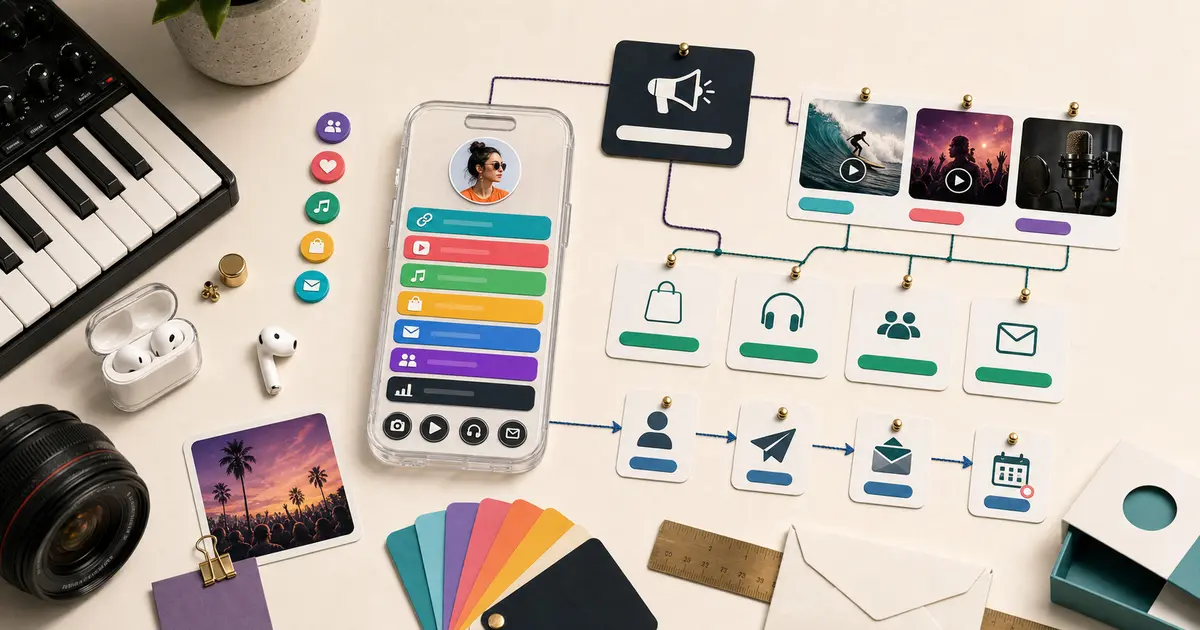
A strong link-in-bio setup gives every visitor one clear place to go next. It holds your most important links, but it also shows enough context that fans understand why each destination is worth a tap. The goal is not to list everything you have ever made. It is to make the next step obvious.
For creators, the best setup is rarely a long stack of buttons. It is a small profile system: current priority first, content previews near the top, evergreen links below, and a structure you can reuse across TikTok, Instagram, YouTube, Twitch, music platforms, newsletters, and shops. Build it once with a clear order and it keeps working as your content changes, instead of drifting into a graveyard of old campaigns.
This guide is the practical, step-by-step companion to the bigger pieces in our library. If you need to understand the category first, start with what is link-in-bio?. If you are weighing tools, the best Linktree alternative roundup covers that. Here, we assume you know you want a page and you want to set it up well.
Start With the Job of the Page
Before adding a single link, decide what the page needs to do this month. A page built around a goal is easy to order. A page built around "everything" is impossible to prioritize.
Common creator goals include:
- Move fans from short-form videos to long-form videos.
- Send listeners to a new release.
- Sell merch, presets, templates, courses, or digital products.
- Grow a newsletter or community you own.
- Make booking, press, or collaboration inquiries easier.
- Give followers a complete profile when one social platform is not enough.
If the goal is current, pin it near the top. If it is evergreen, keep it visible but below your active priority. Write the goal down before you start arranging links, because the order of the page should serve it, not the other way around.
Use a Simple Page Order
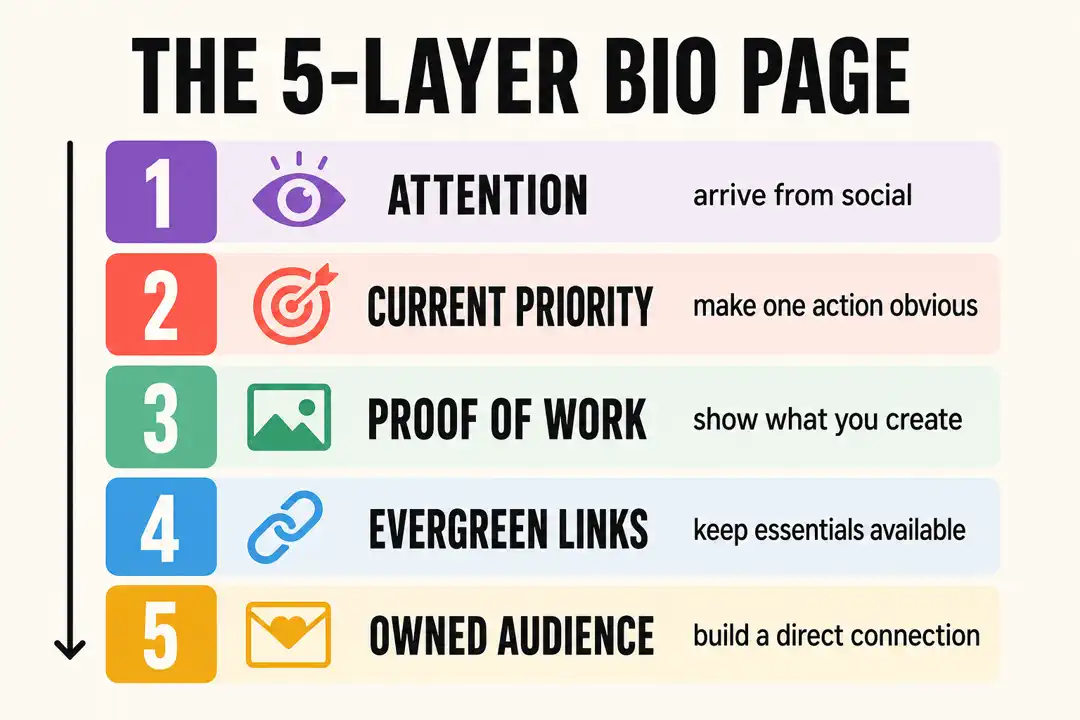
Most creator bio links work best with this order, top to bottom:
- Current campaign, release, video, offer, or announcement.
- Embedded content that shows what you make.
- Primary platform links: YouTube, Spotify, Twitch, Instagram, TikTok, newsletter, or shop.
- Secondary links: press, booking, community, affiliate links, or older offers.
- A contact or collaboration path.
This keeps the page useful for two very different visitors at once. A new fan who just discovered you can understand who you are in a few seconds from the top blocks. A returning fan who came back for a specific thing can find it fast in the primary links. You are not choosing between them. A good order serves both.
For a walkthrough of how this order looks per creator type, from musicians to streamers to DJs, see the creator profile page examples.
Keep the Top of the Page Specific
The first visible block should answer one question: "What should I do right now?"
For a musician, that might be a new single, video, tour date, or merch drop. For a streamer, the live channel, current schedule, or Discord. For a TikTok creator, the exact product, video, or newsletter mentioned in the latest post. The more specific the top block, the more it converts, because a specific offer reads as an answer while a generic list reads as homework.
ByteSize pages are built around that pattern: show the work, then make the next step easy. This is where embedded content matters. Instead of a plain link that sends fans away to decide elsewhere, your YouTube uploads auto-sync onto the page, Spotify and Apple Music appear as playable players, and TikTok and Instagram posts you add show up as embeds. The preview does the convincing before anyone clicks away.
Point Every Social Bio at the Page
A link-in-bio setup is only half done when the page exists. The other half is making sure every platform's bio actually points at it, because the page cannot do its job if fans never reach it.
The move is the same everywhere: put your bytesize.me/yourhandle URL in the single link slot each platform gives you. The mechanics differ a little by platform, and each has its own quirks worth getting right. For the two that trip creators up most, we have step-by-step guides: how to add a link to your TikTok bio and how to add a link to your Instagram bio. Set the same URL on YouTube, X, and anywhere else you have a profile. One page, every bio pointing at it, so whichever platform sends traffic this week lands fans in the same well-ordered place.
If you are moving over from another tool, you do not have to rebuild from memory. Our guide on how to make a Linktree covers what a plain link list does and does not do, and is Linktree free breaks down where free plans stop, both useful context before you commit a setup to one tool.
Avoid the Common Bio Link Mistakes
The most common mistake is adding every possible destination with equal weight. When everything looks equally important, the visitor has to do the sorting, and most will not bother.
Avoid these patterns:
- Fifteen links with no grouping or order.
- Old campaign links still sitting at the top after the campaign ended.
- Generic labels like "click here" or "my stuff."
- No preview of your actual content, just buttons pointing away.
- A page that only makes sense for traffic from one platform.
The fixes are simple and cheap. Use plain, specific labels. Put the single most important link first. Group related destinations so the page scans in blocks rather than one long undifferentiated list. And remove stale campaigns the moment they stop being current, rather than letting them pile up.
Build for Every Platform Where You Publish
A creator bio link should survive platform changes. You might get a wave of traffic from TikTok one week, YouTube the next, and Instagram after that. The same URL should still make sense to all of them.
That is why a hub-and-spoke structure works so well:
- Your ByteSize page is the hub.
- Your videos, posts, music, shop, newsletter, community, and booking links are the spokes.
- Every social bio points back to the same hub.
The payoff is durability. When a platform changes its rules, or an algorithm buries you for a month, your hub does not move and your fans still know where to find everything. You are building on ground you control instead of renting attention one platform at a time. If you are still comparing tools for this, start with the best Linktree alternative guide.
Review It Monthly
Set a recurring review. Bio links get weaker as they go stale, and a short monthly check keeps the page aligned with what you are actually publishing. Once a month, ask:
- Is the top link still current, or is it last month's news?
- Did any campaign end that should come off the page?
- Are the labels clear on a real phone screen, not just the desktop editor?
- Are visitors going where I expected? (On Creator Pro, your analytics show traffic sources, countries, devices, and visit trends to help answer this.)
- Do I need a new section for a release, offer, platform, or collaboration?
Ten minutes a month keeps the page sharp. Skip it for a season and you end up with a top block promoting something that shipped in spring.
A Recommended ByteSize Setup
If you are starting from scratch, here is the fast version:
- Claim a ByteSize handle and reserve your
bytesize.me/yourhandleURL. The free Start plan covers unlimited links, embedded content, and your public page. - Add your current priority as the first block.
- Connect the platforms that matter, so your YouTube uploads auto-sync and your music shows up as playable players.
- Add the TikTok and Instagram posts you want to feature as embeds.
- Group the rest of your links below the priority.
- Point every social bio at the page.
That is a complete setup on the free plan. When you want to see what fans are responding to and remove the ByteSize badge, Creator Pro at $9/mo, or $90/year (2 months free) adds page-level analytics, deeper customization, priority link placement, and branding removal. For a full map of related resources, use the ByteSize guides hub.
FAQ
What should I put first on my link-in-bio page?
Your current priority, whatever you are actively promoting this month. A new release, a current video, a merch drop, a launch, or a booking link. The first block should answer "what should I do right now?" for a first-time visitor, and you should swap it out as soon as it stops being current.
How many links should be on a creator bio page?
Fewer than you probably want. There is no hard limit, and ByteSize gives unlimited links even on the free plan, but a crowded page hides the links that matter. Lead with one clear priority, list your primary platforms, keep a small set of secondary links below, and cut anything that never earns attention.
Do I need a paid plan to set this up?
No. The free ByteSize Start plan covers unlimited links, embedded content, and a public page at your handle, which is everything you need for the setup in this guide. Analytics, deeper customization, priority link placement, and branding removal come with Creator Pro at $9/mo, or $90/year (2 months free), as of August 2026, and most creators start free and upgrade only when it is worth it.
How do I get fans from my socials to the page?
Put your bytesize.me/yourhandle URL in the single link slot each platform gives you, and do it on every profile. The two that need the most care are covered in how to add a link to your TikTok bio and how to add a link to your Instagram bio. Use the same URL everywhere so your setup survives whichever platform sends traffic.
How often should I update my link-in-bio setup?
Do a quick review after any major post or launch, plus a slower monthly check. Confirm the top link is still current, retire ended campaigns, check labels on a phone, and add sections for anything new. A page left untouched for months usually ends up promoting something that is no longer relevant.
Read next
Keep going
- How to Make a Linktree, Step by Step (Or Skip It)A complete, honest walkthrough of how to make a Linktree, plus what a plain link list can't do and a faster way to share everything you make.
- How to Add a Link to Your Instagram Bio (2026 Guide)How to add a link to your Instagram bio in 2026: the bio Links field, adding up to five links, and the Stories link sticker that replaced swipe up.
- How to Add a Link to Your TikTok Bio (2026 Guide)How to add a link to your TikTok bio in 2026: the clickable website field, whether you really need 1,000 followers, and how to share more than one link.
Plan your next step
Turn the guide into a better bio page
- Browse every creator guideMove from setup questions into use cases, comparisons, and link-in-bio fundamentals.
- Compare Linktree alternativesChoose a tool by content, commerce, maintenance, pricing, and creator fit.
- See Bytesize pricingCompare the free Start plan with Creator Pro before you build your page.