Skip to content
For musiciansUpdated July 2026

Link in bio for musicians who release everywhere

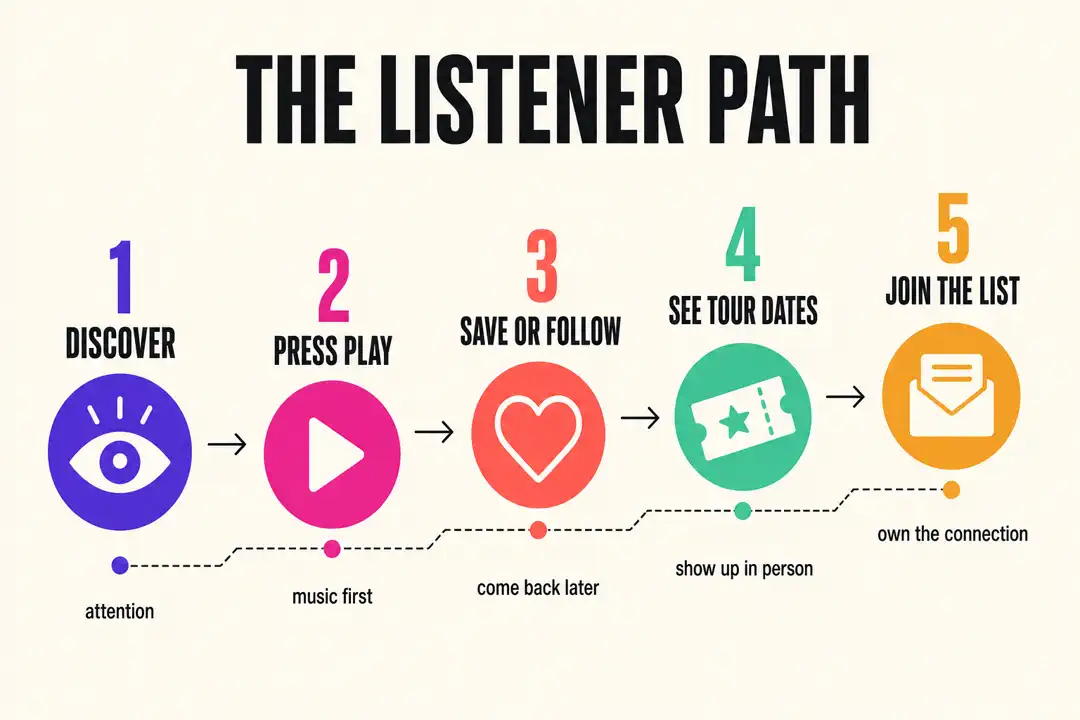
Fans find you one song at a time. Somebody hears a hook on TikTok, catches a live clip on YouTube, saves a cover on Instagram, then forgets the name by the time they're back on Spotify. A link in bio for musicians has one job: catch that scattered attention and turn it into a stream, a follow, a ticket, or a sale before it cools off. Bytesize gives you one page where your latest release, your videos, your merch, and your dates live together, so a new fan never has to guess where to go next.

Why bios break

  • New releases get buried when your bio link still points at last month's single, and the fans who came for the new song bounce.
  • Fans stream in different places. Some want Spotify, some want Apple Music, some want a Bandcamp download, and a plain link list makes them hunt for their platform.
  • A row of gray text links makes your music feel smaller than the work you put into it, and it kills the momentum a good post creates.

What you get

Built for the way fans actually arrive.

Let fans press play before they leave

Add Spotify, Apple Music, and SoundCloud players right on your page so a new listener can hear the track without tapping through to another app first. You choose which songs to feature, so the hook that's pulling fans in is the one they hear.

Keep your videos fresh on their own

Connect your YouTube channel and new uploads show up on your page automatically, so a music video or live session is current the day it drops without you rebuilding anything.

Give every fan a clear path

Group streaming, socials, tour dates, booking, and merch so a fan, a promoter, and a playlist curator each find what they came for in seconds.

See what's actually working

Creator Pro adds page analytics so you can see how many fans land on your page and which platforms send them. Pricing is $9/month as of July 2026.

Setup

A simple structure for your page.

Keep your main Bytesize URL stable. Update the page order as your newest release, post, stream, or campaign changes.

  1. Lead with the release

    Pin your newest single, album, video, or merch drop at the top so the fan who just heard you lands on it first, not three scrolls down.

  2. Group fan and industry paths

    Keep streaming and socials easy to scan for fans, and keep booking, press, and contact links close by for the promoters and curators who show up too.

  3. Update the page, keep the URL

    Share one Bytesize URL across your TikTok, Instagram, YouTube, and Spotify profiles, then change the page order when your campaign changes instead of swapping the link everywhere.

The detail

What a musician's Bytesize page actually holds.

A music page lives or dies on one question: can a fan hear you before they lose interest? Everything below is built around keeping the answer yes.

Your music, playable on the spot

The center of the page is your music. You add Spotify, Apple Music, and SoundCloud players for the songs you want front and center, and fans can press play without leaving. This is the part a plain link list can't do: instead of asking a new listener to trust a gray link and open another app, you let them hear the hook right there.

You pick the tracks, so the page always leads with whatever you are pushing. Dropped a single Friday? Put its player up top Thursday night. The players stay put until you move them, so nothing shifts around on its own.

Videos that stay current without the chore

Connect your YouTube channel once and new uploads appear on the page on their own. A music video, a live take, a studio vlog: it lands on your page the day it goes live, so the fan who clicks through from a Short sees your newest work, not a video from two eras ago.

That's the difference between YouTube and the music players. YouTube auto-syncs. Your Spotify and Apple Music players are ones you add and arrange yourself, which is what you want for a release you are timing on purpose.

Everything a fan or a promoter needs next

Around the music you add the rest of the world: tour dates, ticket links, a merch shop, your newsletter, and every social handle. A fan who wants a shirt and a promoter who wants your booking email both land on the same page and both find their thing fast.

If you are weighing this against a plain Linktree, the move takes a few minutes: claim your handle, add your links and players, and point your existing bios at the one URL. Our Linktree alternative page lays out the differences if you want them side by side.

A page fans want to share

A stale link list is something fans tolerate. A page that looks like your release is something they screenshot and repost, which quietly turns your bio link into promo you didn't have to make. Your colors, your cover art, and your order all carry over, so the page reads as part of the drop.

Preview the whole thing before it goes live so nothing surprises you. The free Start plan keeps the page online and yours; Creator Pro folds in analytics and a badge-free page for $9/month as of July 2026 when you want them.

Built for creators

Music creators already run their fans through one Bytesize page for streams, videos, merch, and booking. Elaine Covers said the previews are beautiful and that the page helped grow her following, and MusicofLola uses a single link to connect fans to everything she makes. Fewer dead ends between hearing you and following you.

Questions creators ask.

Can musicians use Bytesize for multiple streaming services?
Yes. Add Spotify, Apple Music, and SoundCloud players plus links to Bandcamp, YouTube, merch, tickets, and your newsletter. Fans pick their platform instead of hunting for it.
Do the Spotify and Apple Music players update when I release something new?
The players are ones you add and arrange yourself, so they show exactly the songs you choose. New YouTube uploads are the part that syncs automatically. For a release you are timing, adding the player yourself is what you want anyway, since you control what sits up top and when.
Does a music bio link need embedded players?
It helps a lot. A fan who can press play and hear the hook is far more likely to save the track than one staring at a row of gray links. Letting fans hear you before they leave is the main reason to use a page like this instead of a plain list.
Can I take booking inquiries from the same page?
Yes. Add a booking email, a contact link, or a press kit alongside your music so promoters and curators find what they need without a separate site.
How much does it cost to start?
The Start plan is free and you keep your handle. Creator Pro adds page analytics and deeper customization for $9/month as of July 2026, so you can start free and upgrade only when the analytics are worth it.
What if a platform I use isn't a built-in player?
Anything without a dedicated player still works as a link, so you can point fans to Bandcamp, a ticketing site, a Discord, or anywhere else. The built-in players cover Spotify, Apple Music, SoundCloud, and YouTube, and everything else lives as a clean, ordered link.
Your new link in bio is 30 seconds away.

Free to start. Keep your handle forever.

Claim your music page